
Redmi Note 15 Pro+ 5G Smartphone Review
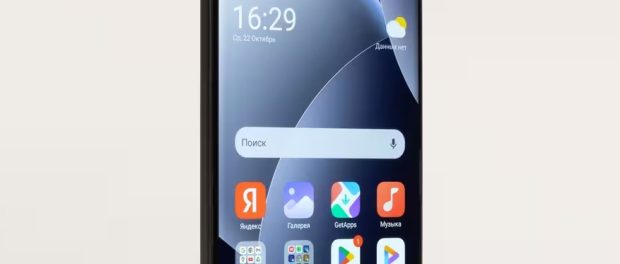
These smartphones were so popular for their balanced price-performance ratio that they earned the unofficial title of “people’s smartphone.” Over time, other Chinese manufacturers have released similarly positioned models, and the top-of-the-line model of this quartet, the Note 15 Pro+ 5G, which we’re reviewing today, falls more in the upper midrange segment.
Key specifications of the Redmi Note 15 Pro+ 5G (model 2510ERA8BG)
- SoC Qualcomm Snapdragon 7s Gen 4, 8 processor cores (1×Cortex-A720 @2.7 GHz + 3×Cortex-A720 @2.4 GHz + 4×Cortex-A520 @1.8 GHz)
- GPU Adreno 810
- Operating system Android 15, HyperOS 2
- AMOLED touchscreen, 6.83″, 1280×2772, 19.5:9, 447 ppi, 120 Hz
- RAM 8/12 GB, internal memory 256/512 GB (UFS 2.2)
- Supports Nano-SIM, eSIM
- Сети 2G GSM, 3G WCDMA, 4G LTE, 5G
- GPS (L1), Galileo, GLONASS, QZSS, BDS
- Wi-Fi 6/6e
- Bluetooth 5.4, A2DP, LE
- NFC
- IR
- USB 2.0 Type-C, USB OTG
- Cameras 200 MP + 8 MP (wide), video 4K@30 fps, gyro-EIS, OIS
- 32 MP front camera
- Proximity and light sensors, magnetic field, accelerometer, gyroscope
- Fingerprint scanner (under the screen)
- IP68/IP69K protection
- 6500 mAh battery, 100 W charging
- Dimensions: 163×78×8.2 mm (or 8.5 mm, depending on the model design)
- Weight 207 g
Appearance and ease of use
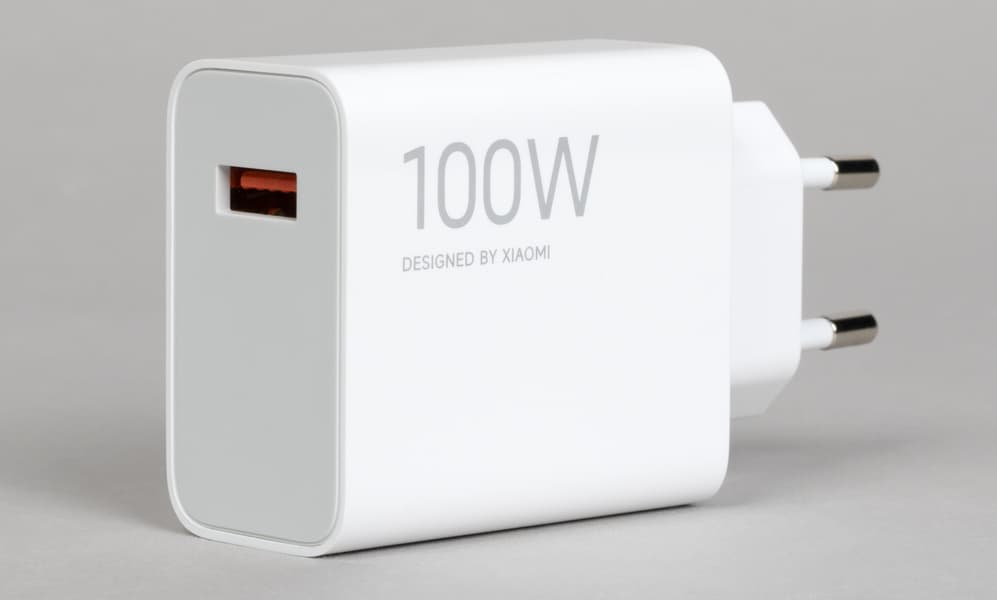
The Redmi Note 15 Pro+ 5G smartphone comes in a standard cardboard box with a connecting cable, a case, and a 100W charger.

The Redmi Note 15 Pro+ 5G features an “intermediate” modern design. The slightly curved edges of the front and back panels don’t dig into your palm, but they don’t make the device as practical as designs with distinct transitions between the edges. The sides are still quite wide and generally smooth, but they’re more rounded, making the smartphone slippery in your hand.

The smartphone is quite wide, large, and heavy, definitely not a contender for the title of miniature device. The case materials vary between models, but the side frame is always made of metallic-painted plastic, not real aluminum.

The backrest can be made of either eco-leather or fiberglass—a composite material made of polymer resin reinforced with fiberglass. The weight of the device varies depending on the materials used.

The front glass here isn’t the usual budget version of Corning Gorilla Glass 7i, popular on affordable Chinese smartphones, but rather premium, high-quality tempered glass—Gorilla Glass Victus 2—with a high degree of scratch resistance. This is a significant difference from most of its peers, bringing this model closer to flagships.

In any case, this smartphone not only features durable glass but also enhanced protection against other adverse effects. The new model’s body is certified to multiple standards for water, dust, shock, and drop resistance. The official release states that “the product has received the SGS 5-Star Premium Performance Certification, confirming compliance with SGS technical standards for drop, bend, and compression resistance. The phone can withstand drops from a height of 2.5 meters onto a smooth granite surface, according to SGS testing standards. The model meets IP66, IP68, IP69, and IP69K standards and is certified to withstand submersion to a depth of 2 meters for 24 hours. This model includes 17 precisely engineered waterproof components to ensure long-term reliability, as confirmed by TÜV SÜD certification for smartphone water resistance.”

The cameras and flash are combined at the back into a single, wide, protruding block, square in shape with rounded corners. It’s certainly good that Chinese designers are moving away from the tired round “puck,” but the difference in this case is minor.
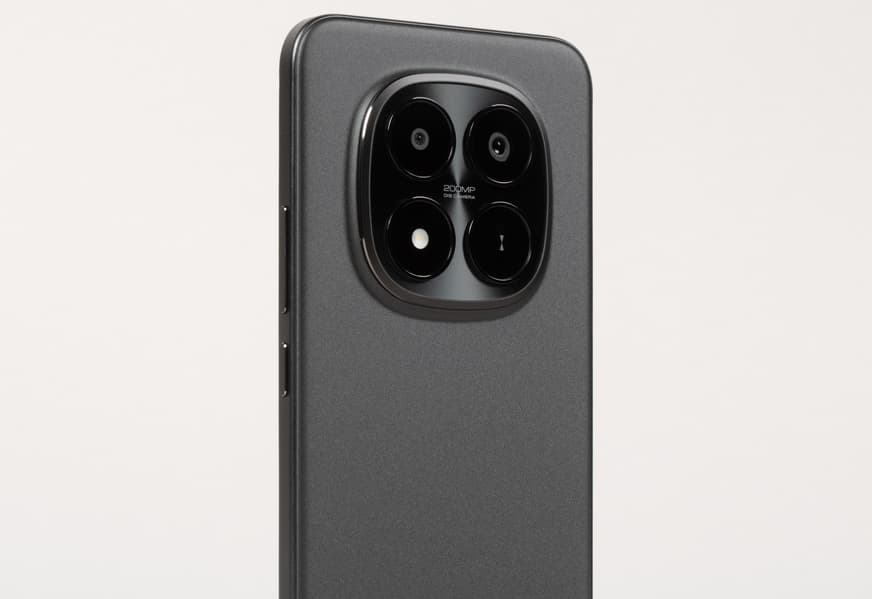
The protruding unit is wide, allowing the smartphone to rest securely on hard surfaces, and the device doesn’t even wobble when using the screen. However, the centrally located cameras are sometimes blocked by fingers when taking photos.

he single front-facing camera is located behind a circular cutout in the display panel. There’s no secondary sensor nearby.

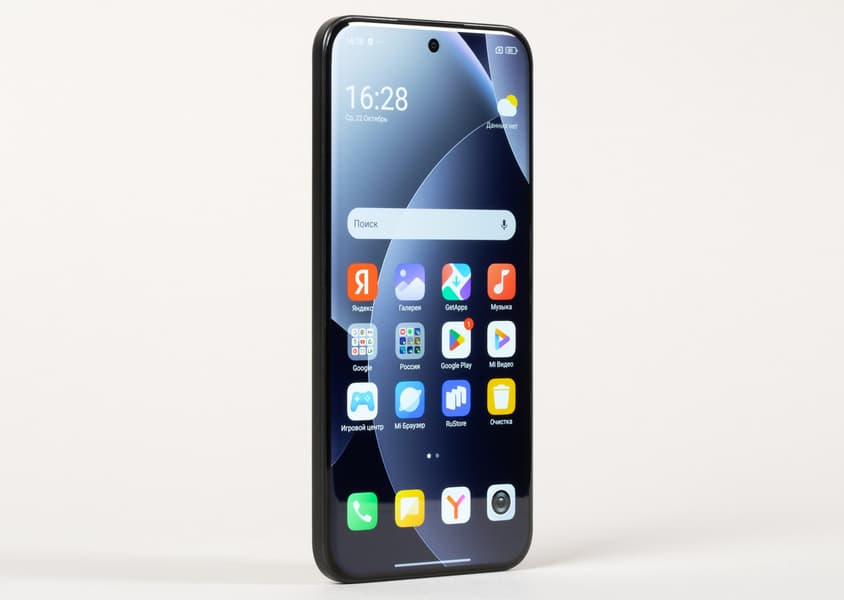
The display bezel is narrow. The optical fingerprint sensor is mounted under the screen at the bottom. Wet Touch 2.0 technology ensures the display remains responsive even if the screen or your fingertips get wet.

Both side buttons are conveniently located—right under your finger on one side. The keys are large, with wide, flat surfaces.

The bottom edge houses the speaker, USB Type-C port, and microphone. A sliding tray accommodates two Nano-SIM cards; there’s no space for a microSD card.

The top edge contains openings for the microphone and speaker. The stereo sound from the two end-mounted speakers is decent. The rich, clear sound is loud and clear. The smartphone also has an IR blaster.

The model is available in several colors: black, blue and brown.
Screen
A detailed examination using measuring instruments was conducted by Alexey Kudryavtsev, editor of the “Monitors” and “Projectors and TV” sections . Here is his expert opinion on the screen of the sample under review.
The front surface of the display is a glass plate with a mirror-smooth, scratch-resistant surface. Based on the reflection of objects, the screen’s anti-glare properties are slightly better than those of the Google Nexus 7 (2013) (referred to below as simply Nexus 7). The outer surface of the display features a special oleophobic (grease-repellent) coating (effective, much better than that of the Nexus 7), making fingerprints significantly easier to remove and appearing less quickly than on regular glass.
With manual brightness control and a full-screen white area, the maximum brightness was approximately 600 cd/m² under normal conditions. With manual control and Daylight Mode enabled, the maximum brightness increases to 800 cd/m² , and in very bright light, with automatic brightness control enabled, it can reach 1000 cd/m² . This is a very high value. Therefore, given the excellent anti-glare properties, daytime readability in direct sunlight should be good.
The minimum brightness is 2 cd/m² , so in complete darkness, the brightness can be reduced to a comfortable level. Automatic brightness adjustment is available using a light sensor (located under the screen, at the top right of the horizontal center). In automatic mode, the screen brightness both increases and decreases as ambient lighting conditions change. This function depends on the position of the brightness adjustment slider: the user can use it to set the desired brightness level in the current conditions. Without intervention, the auto-brightness function reduces the brightness to 4 cd/m² (low) in complete darkness; in an artificially lit office (approximately 550 lux ), it sets it to 110 cd/m² (normal); and in direct sunlight, the brightness reaches 1000 cd/m² (maximum, which is ideal). We weren’t satisfied with the result, so in complete darkness, we increased the brightness to 13 cd/m² , achieving the following values for the three conditions mentioned above: 13, 120, and 1000 cd/m² (which is what we needed). It turns out that the automatic brightness adjustment function works adequately and, to some extent, allows the user to customize their experience to their individual needs.
At any brightness level, there is significant modulation at either 120 Hz or 60 Hz . The figure below shows the brightness (vertical axis) versus time (horizontal axis) for several brightness settings. 60 Hz refresh rate mode :

It’s clear that the modulation duty cycle is low, resulting in no visible flickering. When the brightness is significantly reduced, additional high-frequency modulation ( 3840 Hz ) appears, so visible flickering remains absent.
In the display settings, you can enable a mode with an increased refresh rate of up to 120 Hz :
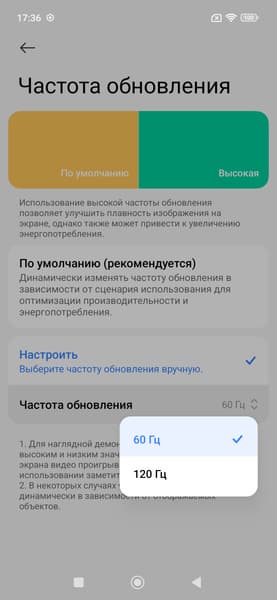
In 120Hz mode , scrolling (menu lists, etc.) is noticeably smoother. The modulation pattern remains essentially unchanged, and there is no visible flickering.

In fact, the mode is always dynamic, and if you don’t touch the screen, the refresh rate may drop to 60 Hz (according to monitoring data). This setting only limits the maximum refresh rate.
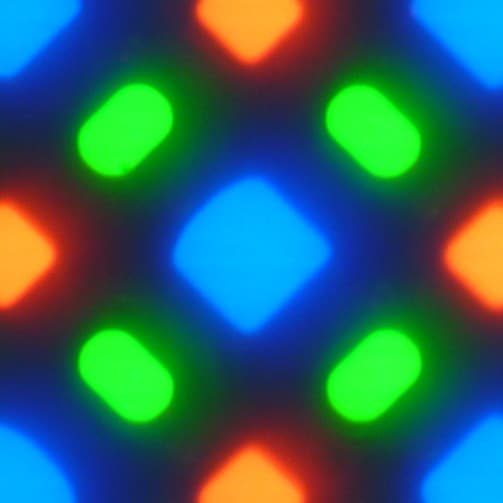
This screen uses an OLED matrix—an active matrix organic light-emitting diode (OLED). A full-color image is created using subpixels of three colors—red (R), green (G), and blue (B), but there are half as many red and blue subpixels, which can be referred to as RGBG. This is confirmed by a fragment of a micrograph:
For comparison, you can view a gallery of microphotographs of screens used in mobile devices.
The fragment above shows four green subpixels, two red ones (four halves), and two blue ones (one whole and four quarters). By repeating these fragments, the entire screen can be laid out without gaps or overlaps. Samsung has coined the term PenTile RGBG for these matrices. The manufacturer calculates the screen resolution based on the green subpixels; it will be lower for the other two. Naturally, some unevenness of contrast edges and other artifacts are present. However, due to the very high resolution, these have only a minimal impact on image quality.
Switching between matrix elements occurs almost instantly, but there may be a step on the switching edge, the width of which depends on the current refresh rate. For a refresh rate of 60 Hz , this is approximately 17 ms , and for 120 Hz , approximately 8 ms . For example, this is how brightness (vertical axis) depends on time (horizontal axis) when transitioning from black to white ( 60 Hz and 120 Hz modes ):
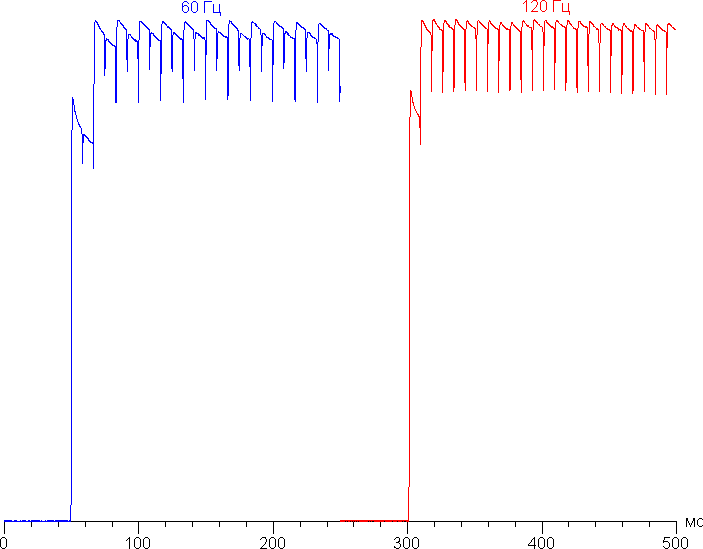
In some conditions, the presence of such a step can (and does) lead to trails that follow moving objects.
A gamma curve plotted using 32 equally spaced grayscale points showed no significant rolloff in either the highlights or shadows ( Standard Pro profile ). The exponent of the approximating power function is 2.15, close to the standard value of 2.2. The actual gamma curve deviates little from the power law:
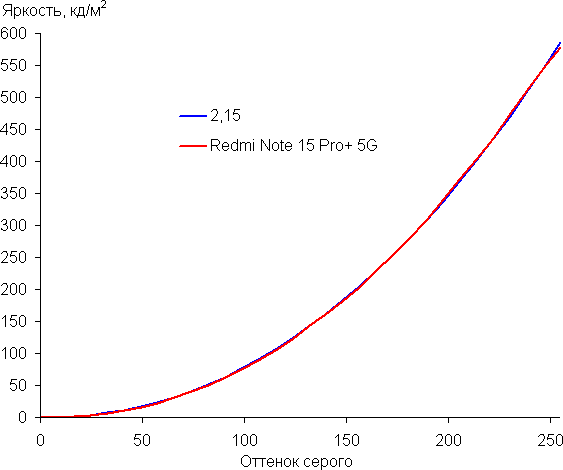
It’s worth noting that with OLED screens, the brightness of image fragments changes dynamically depending on the nature of the displayed image—it decreases slightly for generally bright images. As a result, the resulting brightness-to-hue curve (gamma curve) likely doesn’t correspond to the gamma curve of a static image, as the measurements were taken with successive shades of gray displayed across almost the entire screen.
The screen has excellent viewing angles. Brightness drops noticeably at angles for both screens (compared to the Nexus 7), but the drop in brightness is much less pronounced on the smartphone. As a result, even with nominally identical brightness settings, the smartphone’s screen appears visually much brighter (compared to LCD screens), as the mobile device’s screen is often viewed at at least a slight angle. True, whites on the smartphone acquire a slight blue-green tint at greater angles, but blacks remain simply black at any angle. Blacks, of course, remain simply black at any angle. They are so black that the contrast ratio is inapplicable. For comparison, we provide photographs in which the same images are displayed on the smartphone and the second comparison device, with the screen brightness initially set to approximately 200 cd/m² and the color balance on the camera forced to 6500 K.
Perpendicular to the screens is a white field:

Note the good uniformity of brightness and color tone of the white field.
And a test image ( Standard Pro profile ):

Saturation is normal, no increase in color contrast is observed, and color balance is slightly off. Please note that the photograph is not a reliable source of information on color rendering quality and is provided for illustrative purposes only. Specifically, the pronounced reddish tint of the white and gray areas present in smartphone screen shots is visually absent when viewed perpendicularly, as confirmed by hardware tests using a spectrophotometer. This is because the spectral sensitivity of the camera sensor does not precisely match that of human vision.
The photo above was taken using the Standard Pro profile in the display settings. There are three basic profiles, and in the Advanced Settings tab , you can select two more profiles and adjust the color balance with numerous settings, etc.

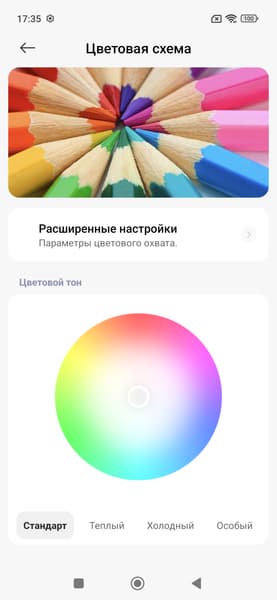
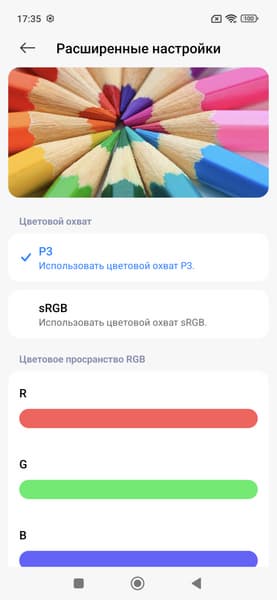

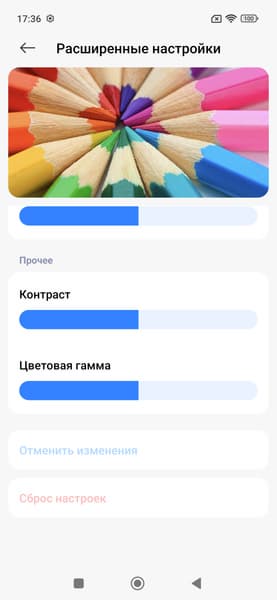
The color gamut (and color balance) depends on the selected profile, the profile embedded in the image itself, and the program displaying the image on the smartphone screen. If the image doesn’t contain a profile, it’s assumed to be sRGB. The software displaying the image must be aware of the screen’s capabilities. For example, Google Chrome supports image profiles but assumes the screen is sRGB. However, the built-in Gallery app is aware of the screen’s capabilities.
Let’s consider two extreme cases.
The color gamut with the selected Saturated profile is very wide, wider than DCI-P3, regardless of the profile in the image and software:

Accordingly, the colors are oversaturated (in the case of an sRGB image):

In the case of an image with an sRGB profile (or without a profile) with the Standard Pro profile selected when outputting to Gallery or Google Chrome, as well as in the case of any image with the sRGB profile selected , the color gamut is close to sRGB:

In the first case, the component spectra (that is, the spectra of pure red, green and blue colors) are very well separated:

In the second case, the color components are mixed with each other to a significant degree:

Accordingly, when the Vivid or P3 profile is selected , as well as in the case of an image with a DCI-P3 profile, when the Standard Pro profile is selected and when output in the Gallery software, the color gamut is close to DCI-P3:

Accordingly, the colors are slightly oversaturated (in the case of an sRGB image, P3 profile ):

Thus, the Saturated profile forces the color gamut to be expanded to the maximum, Vivid or P3 adjusts the color gamut to DCI-P3, and sRGB adjusts the color gamut to sRGB. Standard Pro adjusts the gamut (if possible) to match the specified profile when outputting to the Gallery app, while third-party programs output to sRGB. However, only the sRGB profile ensures the default color balance is as close to the standard as possible.
It’s worth noting that on wide-gamut displays (without appropriate color correction), the colors of standard images optimized for sRGB devices appear unnaturally saturated. Hence, the recommendation: in most cases, it’s better to view movies, photos, and other natural-looking content using the Standard Pro profile . However, if an image uses a profile other than sRGB, it’s better to view it using the built-in Gallery app.
When choosing the sRGB profile , the balance of shades on the gray scale is good, but the color temperature is still slightly higher than the standard 6500 K – about 7400 K on a white background.
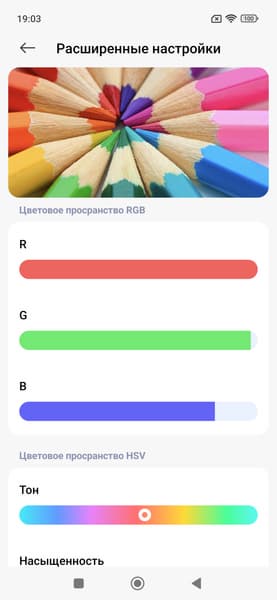
After a simple adjustment (sliders as in the image above), the color balance improves, as the color temperature is already very close to the standard 6500 K , and the deviation from the blackbody spectrum (ΔE) is below 10 units, which is considered acceptable for a consumer device. Moreover, the color temperature and ΔE vary little from shade to shade, which positively impacts the visual assessment of the color balance. (The darkest areas of the grayscale can be ignored, as color balance is less important there, and the measurement error for color characteristics at low brightness is large.)
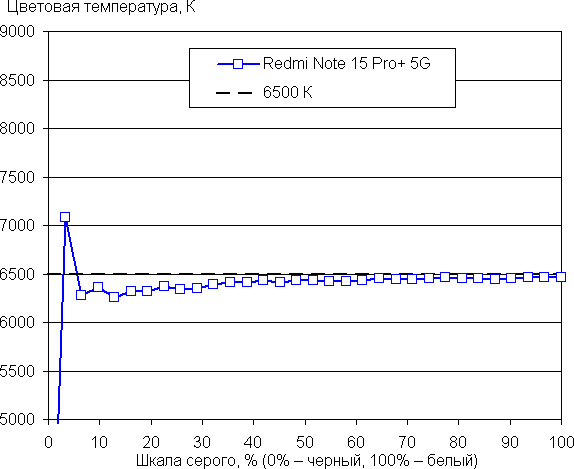
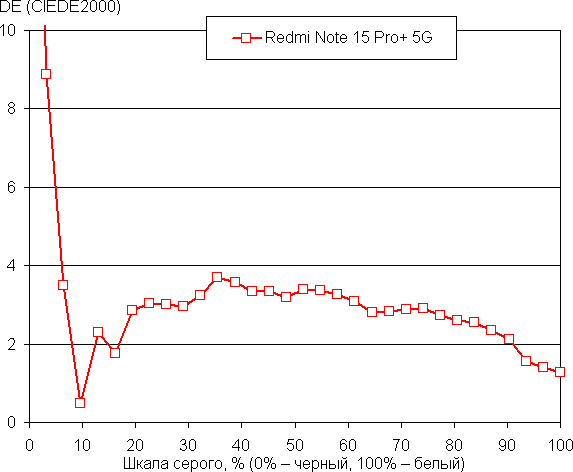
Of course, there’s a mode with reduced blue light. As a reminder, bright light can disrupt circadian rhythms (see the article about the iPad Pro with a 9.7-inch display ), but this can be resolved by reducing the brightness to a low but still comfortable level. There’s absolutely no point in distorting the color balance by reducing the blue light.
This device does not appear to support DisplayPort Alt Mode for USB Type-C – outputting image and sound to an external device when connected to a USB port. ( USBTreeView report ).
Let’s summarize. The screen has a very high maximum brightness (potentially up to 1000 cd/m² ) and excellent anti-glare properties, so the device can be used outdoors without problems, even on a sunny summer day. In complete darkness, the brightness can be reduced to a comfortable level (down to 2 cd/m² ). The automatic brightness adjustment mode is acceptable, and it works adequately. The screen’s advantages include an effective oleophobic coating, high resolution, flicker-free operation, support for a high refresh rate of 120 Hz , a color gamut close to sRGB, and very good color balance (when choosing the right profile), as well as color rendition adjustment to the profile embedded in the image using proprietary software. We should also recall the general advantages of OLED screens: true black (if nothing is reflected on the screen), good white field uniformity, and a noticeably smaller drop in image brightness when viewed at an angle than with LCD. Overall the screen quality is very high.
It’s worth noting that, in terms of image quality, curved edges are detrimental, as this design flaw introduces color distortions and reduces brightness at the edges of the image, and in ambient light conditions, leads to inevitable glare along at least one side of the screen. Fortunately, in this case, the curved edges only extend very slightly into the display area.
Camera
The Redmi Note 15 Pro+ 5G smartphone is equipped with only two rear cameras – a main one and a wide-angle one, without a telephoto lens and, accordingly, without optical zoom.
200 MP, 1/1.4″, 0.56 μm, f/1.7, 23 mm, multi-directional PDAF, OIS
8 MP, 1/4.0″, 1.12 µm, f/2.2, 15 mm, 120˚
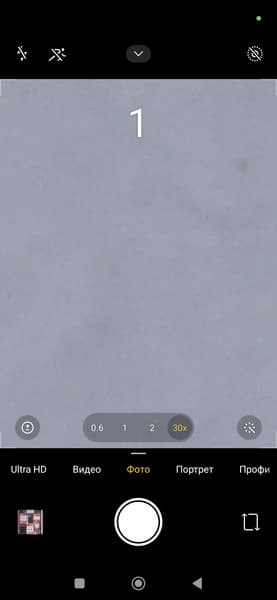
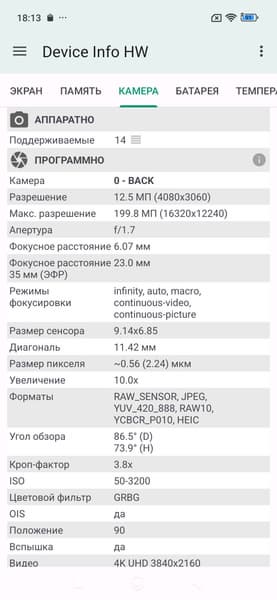
The main camera shoots by default in 4-in-1 pixel binning mode. You have to manually switch to 200MP mode. 200MP photos certainly offer a higher level of detail, but the images are soft, often pixelated, and filled with artifacts. In this case, we sorely miss the popular “intermediate” 50MP mode with minimal processing, which would preserve high detail but remove obvious imperfections and slightly enhance sharpness. In this case, we definitely recommend shooting in 200MP if you want to get the most out of your photos and are willing to edit them in a photo editor. However, for everyday tasks, this mode seems excessive due to the huge file size (44MB vs. 4MB) and the time-consuming processing and scrolling through them.









The main camera produces decent images. While detail isn’t exceptional, sharpening achieves good clarity, and the dynamic range is quite wide. The image is clear and bright, noise-free, with good geometry and almost no loss of sharpness at the edges. However, the processing is aggressive: the high level of sharpening and distorted, harsh color rendition are noticeable. For a mid-range smartphone without any pretensions to being a flagship, this is probably acceptable quality.
More examples of photos taken with the main camera in auto mode:







There’s no dedicated zoom camera; zoom is digital only, achieved by cropping full-size photos. However, we’ve already noted the high level of detail in 200MP photos, so both 2x and (with caveats) 4x zoom are useful and provide more information. The maximum digital zoom is 30x.

1×

2×

4×

1×

2×

4×

1×

2×

4×

1×

2×

4×

1×

2×

4×
The second camera, for wide-angle shooting, produces equally bright and clear photos, with white balance similar to the main camera. Detail, understandably, is lower, and blurriness towards the edges of the frame is clearly noticeable, making it not entirely a peerless camera; it’s worth switching to it only when you need to fit more into the frame.

main camera

wide angle

main camera

wide angle

main camera

wide angle

main camera

wide angle

main camera

wide angle
The smartphone records video at a maximum resolution of 4K, but only at 30 frames per second. To increase the frame rate, you’ll have to lower the resolution to 1080p. But even then, the processor still struggles: in both modes, there’s slight strobing, and sometimes even longer delays. The image itself is quite bright and clear, but as with photography, there’s visible sharpening and distorted, oversaturated, unnatural color rendition.
The front camera (32 MP, f/2.2) also produces unnatural colors, but otherwise the quality is solid in terms of clarity, brightness, and dynamic range. However, it’s not top-notch, nor is smartphone photography in general.

The smartphone’s network capabilities include support for mobile networks up to 5G, dual-band Wi-Fi 6/6e, Bluetooth 5.4, and NFC. It also supports virtual e-SIM cards. In practice, within the Moscow region, the device demonstrated reliable wireless performance, maintained connection, and quickly restored connection after a disconnect.
All the necessary built-in sensors, including the gyroscope, are in place. The proximity sensor is physical.
The single-channel (according to the results of a specialized test) satellite navigation module works with GPS, as well as with Galileo, GLONASS, QZSS and BDS.
The earpiece volume, as well as the stereo sound from the main speakers, is sufficient. The vibration alert is clearly noticeable.


Software and multimedia
The software platform is a proprietary, updated HyperOS 2 shell based on Android 16. The manufacturer guarantees the release of up to seven key Android operating system updates. The interface is highly optimized, with smooth scrolling and fast app loading. A key feature of the interface is the two-section top bar (dependent on the swipe zone). The device uses Google services and has access to the Google Play Store. Drawbacks include pop-up ads and a large selection of pre-installed free apps, which require additional setup after purchasing a Xiaomi smartphone.
.


Performance
The Redmi Note 15 Pro+ 5G smartphone is powered by an octa-core Qualcomm Snapdragon 7s Gen4 SoC, manufactured using a 4-nanometer process. While this platform isn’t top-of-the-line, it’s a solid mid-range performer, allowing the smartphone to score over 1 million points in AnTuTu 11 (true flagships score nearly 4 million points in this version of the test). This performance is sufficient for most standard office tasks, but 4K video recording at 60 fps is unavailable, and demanding games will require lower graphics settings.


AnTuTu and GeekBench benchmarks:
For convenience, we’ve compiled all the results we obtained while testing the smartphone using the latest versions of popular benchmarks into tables. The table typically includes several other devices from various segments, also tested using similar, latest versions of benchmarks (this is done solely to provide a clearer overview of the resulting figures). Unfortunately, results from different benchmark versions can’t be presented in a single comparison, so many worthy and relevant models are left out because they were previously tested using previous versions of the benchmark software.
| Redmi Note 15 Pro+ (Qualcomm Snapdragon 7s Gen4) |
OnePlus 15R (Qualcomm Snapdragon 8 Gen5) |
Vivo X300 (Mediatek Dimensity 9500) |
Realme P3 Ultra (Mediatek Dimensity 8350 Ultra) |
Realme GT 8 Pro (Qualcomm Snapdragon 8 Elite Gen5) |
|
|---|---|---|---|---|---|
| AnTuTu (v11.x) (higher is better) |
1048331 | 2808823 | 3191134 | 1155267 | 3972579 |
| GeekBench 6 (bigger is better) |
1227/3139 | 2761/9360 | 3262/9777 | 1280/4240 | 3472/10580 |


Testing the graphics subsystem in gaming tests:


Test results in the comprehensive test:

Memory speed test results:

Heating test results:
We test performance degradation with heat using Burnout Benchmark , which stresses the CPU, GPU, and NPU. GPU throttling is moderate.


Battery life
The Redmi Note 15 Pro+ 5G smartphone features a built-in 6500 mAh battery. With such a battery, the device, as expected, demonstrates a high level of battery life.
Testing was traditionally conducted at a typical power consumption level, without using any power-saving features, even though the device has them. Test conditions: brightness set to the minimum comfortable level (approximately 100 cd/m²). Tests: continuous reading in Moon+ Reader (with the standard, light theme); continuous HD video playback (720p); and Injustice 2 with automatic graphics settings.
| Battery capacity | Reading mode | Video mode | 3D gaming mode | |
|---|---|---|---|---|
| Redmi Note 15 Pro+ 5G | 6500 mAh | 33 h. 00 m. | 29 h. 00 m. | 8 a.m. 00 p.m. |
| OnePlus 15R | 7400 mAh | 39 h. 00 m. | 33 h. 00 m. | 8 a.m. 00 p.m. |
| Vivo X300 | 6040 mAh | 24 hours 00 minutes. | 22 h. 00 m. | 6:00 a.m. |
| iQoo 15 | 7000 mAh | 35 h. 00 m. | 32 h. 00 m. | 8 a.m. 00 p.m. |
| Samsung Galaxy S25 FE | 4900 mAh | 20 h. 00 m. | 18 h. 00 m. | 7:00 a.m. |
| Xiaomi 15T Pro | 5500 mAh | 29 h. 00 m. | 25 h. 00 m. | 8 a.m. 00 p.m. |
| Realme 14 5G | 6000 mAh | 25 h. 00 m. | 23 h. 00 m. | 8:30 a.m. |
| iQoo Z10 | 7300 mAh | 34 h. 00 m. | 29 h. 00 m. | 9 a.m. 00 p.m. |
| Realme 14 Pro+ | 6000 mAh | 23 h. 00 m. | 19 h. 00 m. | 8 a.m. 00 p.m. |
| Samsung Galaxy Z Flip7 | 4300 mAh | 23 h. 00 m. | 21 h. 00 m. | 5 h. 00 m. |
These are the maximum possible figures obtained under “ideal” conditions, including without SIM cards installed. Any changes to the operating scenario will likely result in deterioration of the results.
The Redmi Note 15 Pro+ 5G supports 100W fast charging and charges in less than 50 minutes with the included charger. It also supports reverse charging (22.5W).
Result
The Redmi Note 15 Pro+ 5G is a well-balanced mid-range smartphone that generally meets the basic needs of a modern user. Impressive case protection, a high-quality AMOLED display, and long battery life are its undeniable strengths. However, it doesn’t boast high performance; the top-end configuration uses UFS 2.2 (an outdated, slow flash memory mode), and photo and video recording are average. Russian prices are as follows: 39,000 rubles for 8/256 GB of storage and 45,000 rubles for 12/512 GB.

Leave a comment